Building Your First Skill
Why this matters
In the last chapter, you learned what skills are. Now let's build them. We're going to create four skills that every business owner needs, regardless of industry. Then you'll build one specific to your business.
This is where the course pays for itself. These skills will save you time every single week. Not one-off tricks. Permanent upgrades to how your business runs.
How to create a skill
You don't need to open a text editor or write files manually. Just tell Claude what you want and it creates the skill file for you. Make sure Claude is pointed at your business folder so the files save in the right place.
For each skill below, we'll give you the exact words to type into Claude. Copy and paste them, or adjust to suit your business.
Skill 1: Briefing file keeper
This is the most important skill you'll build. It keeps your CLAUDE.md file up to date automatically.
Remember in Chapter 3 we said your briefing file is a living document? This skill makes sure it actually stays alive. Tell Claude:
From now on, every time you say something like "I just hired a VA named Sarah" or "we've dropped our minimum price to $500", Claude updates your briefing file automatically.
Every other skill depends on your CLAUDE.md being accurate. If your briefing file says you charge $80/hour but you raised it to $100 last month, every quote Claude writes will be wrong. This skill prevents that.
Skill 2: Email drafter
Everyone sends emails. This skill tells Claude how to write them in your voice. Tell Claude:
Now whenever you say "write an email to [person] about [thing]", Claude writes it in your voice, your style, every time.
Skill 3: Follow-up tracker
Every business owner forgets to follow up. This skill keeps track. Tell Claude:
Now Claude tracks your follow-ups and reminds you at the start of every session. No more things falling through the cracks.
Skill 4: Meeting and call notes
After every call or meeting, instead of writing up notes yourself, just tell Claude what happened. Tell Claude:
After a call, you just tell Claude "I just got off a call with Sarah, we discussed [topic], she's going to [action], I need to [action]." Claude writes it all up, saves it, and adds the follow-ups to your tracker.
You're not typing instructions into a text editor. You're just telling Claude what you want in plain English and it builds the skill file for you. That's how all of this works. You describe what you need, Claude creates it.
Now build one for YOUR business
The four skills above work for everyone. Now let's build one specific to what you do. Think about the task you dread most. The one that eats up your time every week. Common picks:
| Industry | Good first skill |
|---|---|
| Trades | Quoting |
| Creative / Marketing | Proposals or shot lists |
| Hospitality | Rostering or supplier orders |
| Professional services | Client update emails |
| Retail | Product descriptions |
| Travel / Tourism | Itinerary drafts |
| Beauty / Wellness | Rebooking reminders |
| Real estate | Property descriptions |
To build it, think about these questions:
- What triggers this task? (A client calls? An email comes in? You finish a job?)
- What information do you need? (Client name? Job details? Budget?)
- What are the steps? (Write them as if you're explaining to a new employee)
- What are your rules? (Minimum prices? Things you always include? Things you never do?)
- What does a good result look like?
Then tell Claude: "Create a skill file called [task-name].md in my Skills folder. Here's how this task works in my business: [describe it]." Claude will create the file for you.
What a skill file looks like
For reference, here's the structure Claude creates. You don't need to write this yourself, but it helps to understand what's inside:
# Skill: [Task Name]

## When to use this
[When does this task happen? What triggers it?]

## What I need
[What information is required before starting?]

## How to do it
1. [Step 1]
2. [Step 2]
3. [Step 3]
4. [Continue as needed]

## Rules
- Always: [thing you always do]
- Always: [another thing]
- Never: [thing you never do]
- Never: [another thing]
- [Any specific formatting, pricing, or tone rules]

## Example of a good result
[Paste or write an example of what this should look like when done well]
Stuck? Hit the purple ? button at the bottom right of this page and ask your question. The AI tutor knows this chapter inside out.
Your second skill: A real business task
Now let's build a skill for something you actually do every week. Here's a full worked example using a painter's quoting skill. Your business will be different, but the structure is exactly the same. Focus on the format, not the specifics.
Worked example: Quoting skill
Here's what a quoting skill looks like when it's done properly. This one's for a service business, but the structure works for any industry. Replace the details with your own:
# Skill: Write a Quote

## When to use this
When a client asks for a price, after a site visit or
initial enquiry via email or phone.

## What I need
- Client name and contact details
- What they need done (scope of work)
- Any special requirements or preferences
- Timeline or urgency
- Location (if relevant to pricing)

## How to do it
1. Work out the price based on the scope and my rates
2. Write up the quote using my standard format
3. List what's included and what's not
4. Add my terms and conditions
5. Save and send to the client

## Pricing rules
- [Your rates here, e.g. hourly, per unit, per project]
- Minimum job: $[your minimum]
- Complex or rush work: add [X]% to base price
- Always include GST in the final price
- Never discount below my minimum rates

## Format rules
- Quote number: Q-[year]-[number] (e.g. Q-2026-047)
- Include: scope of work, price breakdown, inclusions,
  exclusions, validity (30 days), payment terms
  (50% deposit, balance on completion)
- Tone: professional but friendly. Not too formal.
- Always include my ABN and insurance details

## Inclusions (always list these)
- All materials and supplies
- [Standard service items for your business]
- Clean up on completion

## Exclusions (always list these)
- Work outside the agreed scope
- [Things you don't cover or charge extra for]
- [Anything clients commonly assume is included but isn't]

## Example
[Paste an actual quote you've sent before that you were
happy with - this teaches Claude your real format]
That's specific. That's detailed. And that's exactly what makes it work. Your version will look different, but follow the same structure: when to use it, what you need, how to do it, your rules, and an example of a good result.
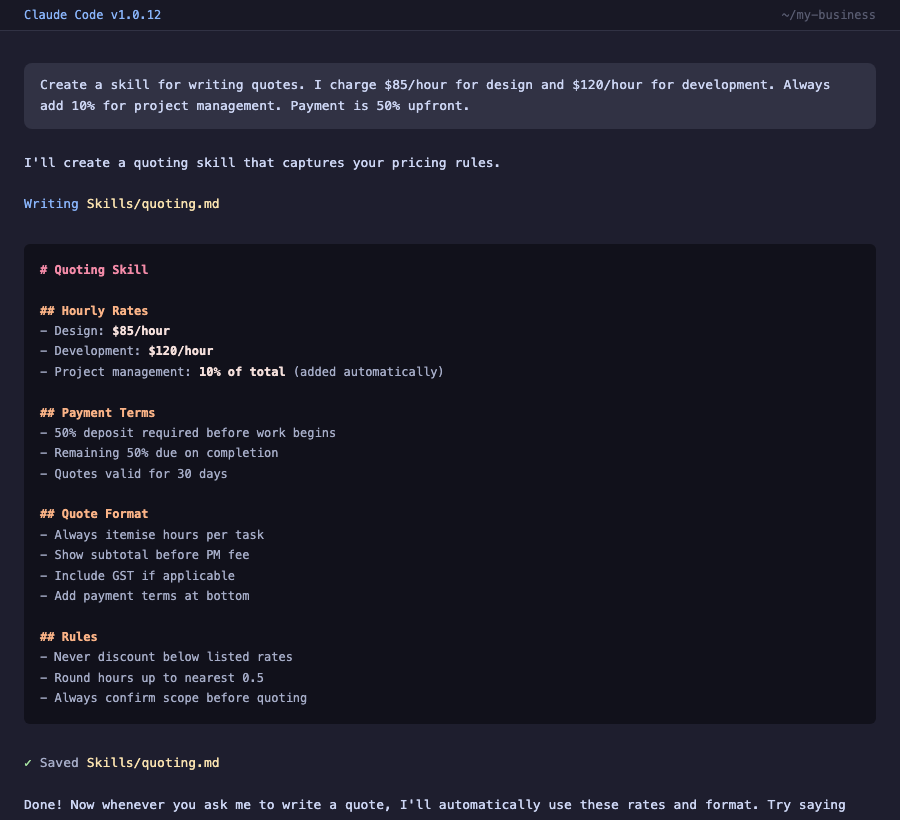
Step 4: Get Claude to create the file
Instead of saving files manually, just tell Claude to do it. For example:
Claude will create the folder and file for you. It'll be in your working folder, organised and ready to use.
Step 5: Test it
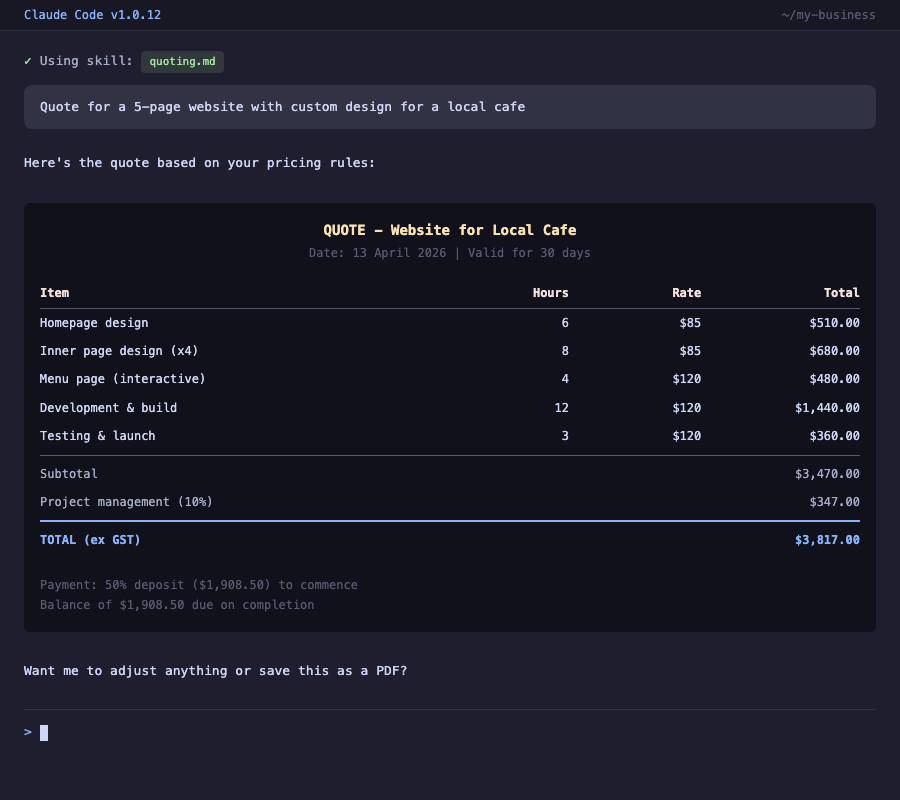
Make sure Claude is pointed at your business folder. Then type something like:
Write me a quote for Sarah Mitchell. She needs [describe the job in your own words - what they want, how big, any special requirements]. Standard timeline, nothing urgent.
Claude will read your CLAUDE.md (knows your business) AND your quoting skill (knows your format, pricing, rules). It should produce a quote that looks like something you'd actually send.
Step 6: Refine it
The first output probably won't be perfect. That's normal. That's the point.
Look at what Claude produced and ask yourself:
- Is the format right?
- Are the prices correct?
- Did it follow my rules?
- Does the tone sound like me?
- What's missing?
Whatever's wrong, don't just tell Claude to fix it. Instead, go back to your skill file and add a rule that prevents the mistake. This is the most important habit in the entire course. We cover it properly in Chapter 7.
For now, make any obvious fixes to your skill file, save it, and test again.
That's fine. Everyone's is. The skill file is a first draft. You'll refine it over the next few weeks as you use it. Every time Claude gets something wrong, you update the skill. After 10-15 corrections, it'll be dialled in and producing output that's genuinely as good as what you'd write yourself. The key is: don't give up after one test. Give it a week of real use.
That's actually a really valuable discovery. If you can't explain your pricing to an AI, your clients probably find your pricing confusing too. Writing a skill file forces you to clarify your own processes - and that's good for your business regardless of AI.
What you just learned
- Building a skill follows a simple process: pick a task, write down how you do it, convert to a .md file, test, refine
- The more specific your rules, the better Claude performs
- Your first attempt won't be perfect - that's expected and okay
- The skill file forces you to clarify your own processes (which is valuable on its own)
- Every skill you build saves you time forever
Try it yourself
- Create the briefing file keeper skill
- Create the email drafter skill
- Create the follow-up tracker skill
- Create the meeting notes skill
- Build one skill specific to your business
- Test each skill with a real scenario